Early access — waitlist open

Financial clarity for people who hate budgeting apps.

Connect your accounts once. The AI categorizes your spending, tracks how long your money lasts, flags what's unusual, watches your goals, and keeps your net worth current. No budgets to set. No categories to manage. No dashboard to build.

No credit card. No account. Just your spot in line.
Invisible Budget AI assistant answering 'What are my biggest expenses?' with a visual spending breakdown
23 Smart categories
3 Layers of categorization
0 Budgets to set
5 min Setup time
The old way

You've tried the apps. Set the categories. Checked the dashboards. Felt guilty when you were over. Quit in three weeks. Repeated next January.

The Invisible Budget way

Budgeting should be invisible. The AI does the work. You make the decisions. No dashboards. No guilt. Just clarity.

Setup

Five minutes of setup. Then the system takes over.

01

Connect your accounts.

Link your bank and credit card accounts through a secure, read-only connection. Takes about two minutes. It can see your transactions — it can never touch them.

02

Answer a few questions.

The AI asks about your situation — how you earn, whether your income is steady or varies, who counts on you, what matters most right now. A short conversation, not a form. It's the last thing it needs from you.

03

Open it and everything's waiting.

The AI categorizes every transaction, calculates your cash runway, and keeps your briefing ready — income against spending, unusual charges, upcoming bills. Ask anything in plain English and get visual answers, not spreadsheets. No categories to define. No rules to set up.

What you get

Financial clarity without the homework.

01

Everything you own and owe. One number.

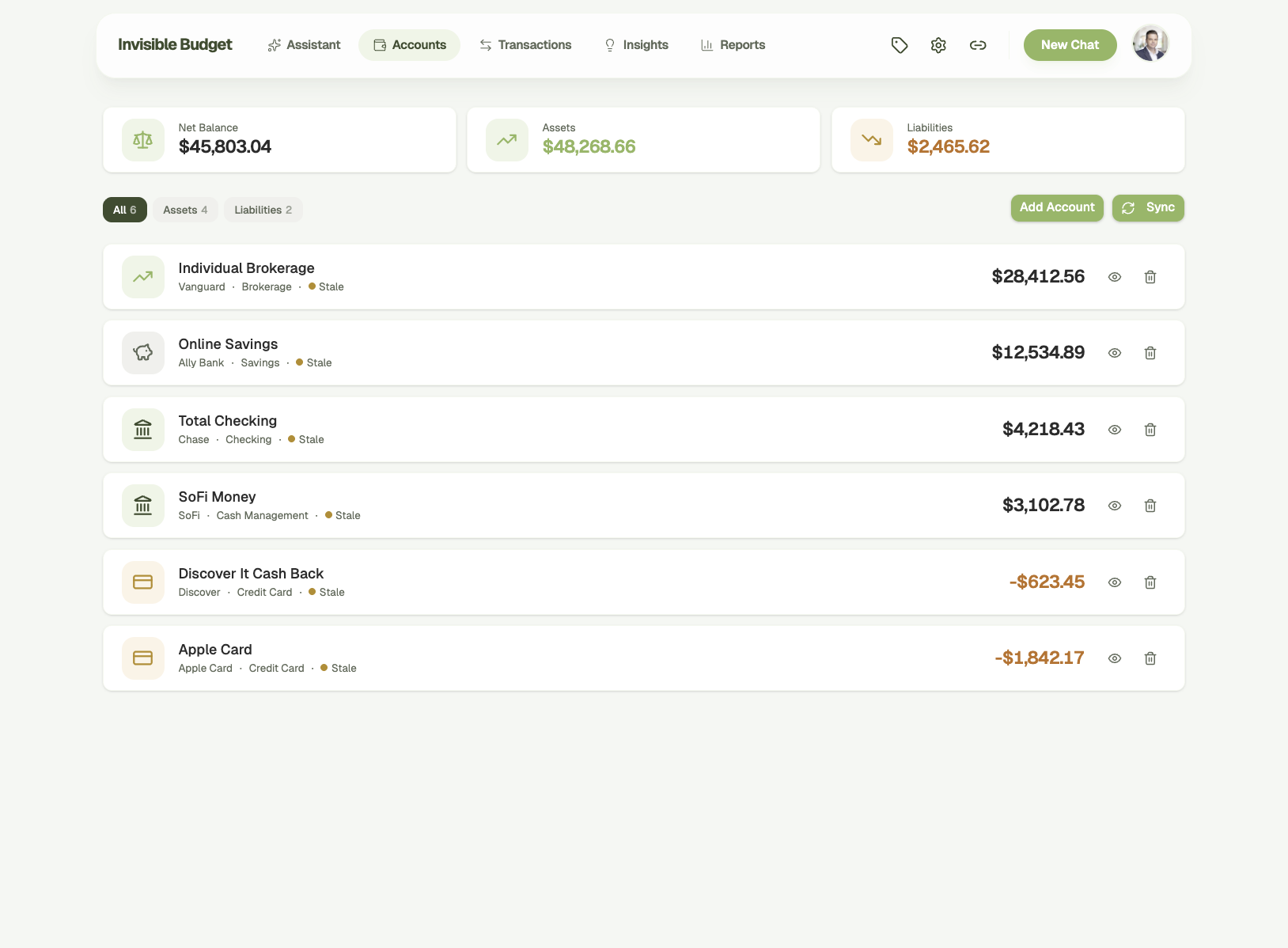
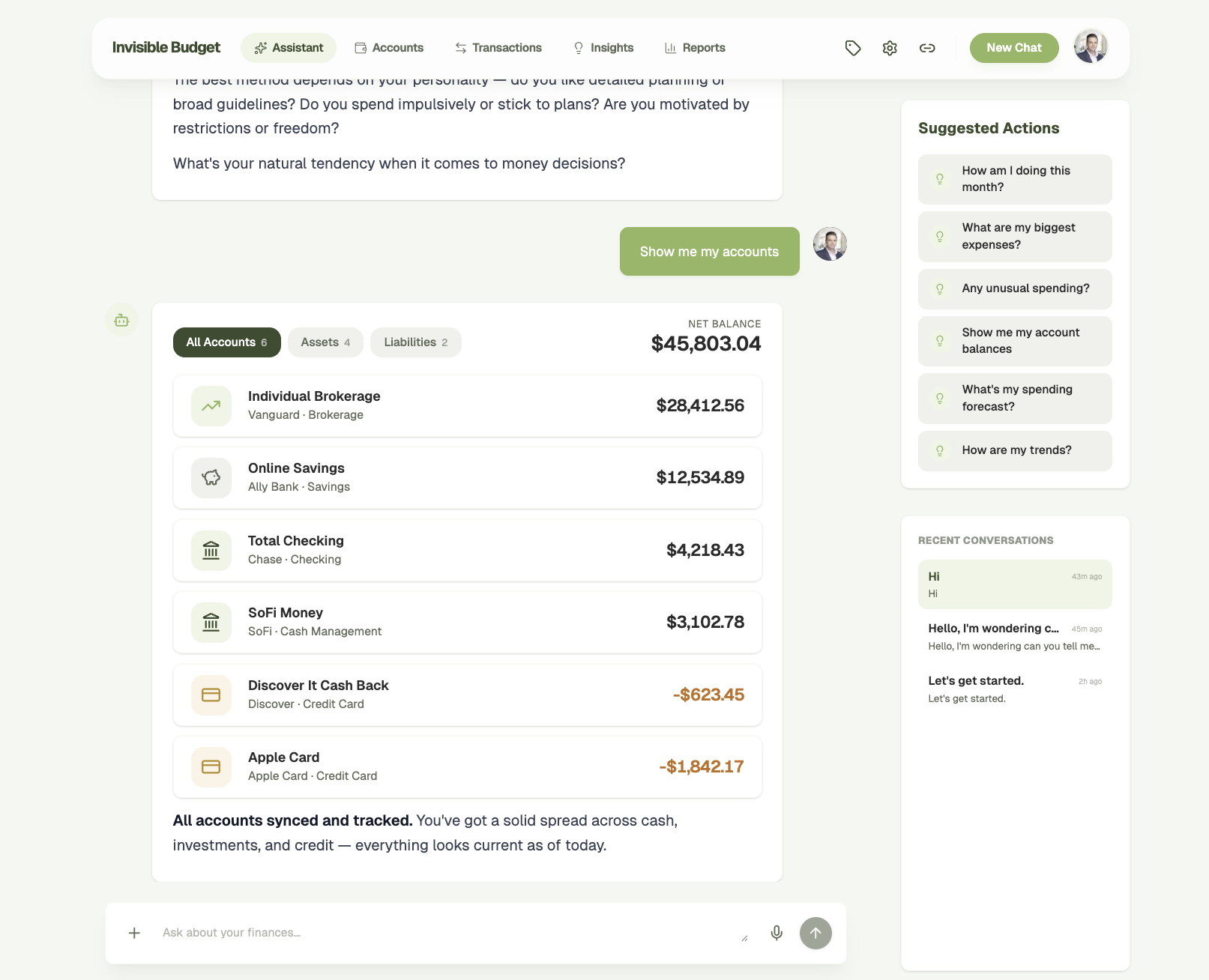
Checking, savings, brokerage, credit cards — every connected account syncs itself and stays current. Add the things banks don't know about: your house, your car, an investment held somewhere else. The ledger nets what you own against what you owe and keeps twelve months of net worth history, so you can see the direction, not just today.

Accounts overview showing net balance, assets, and liabilities across all connected accounts
02

Stop counting pennies. Know your runway.

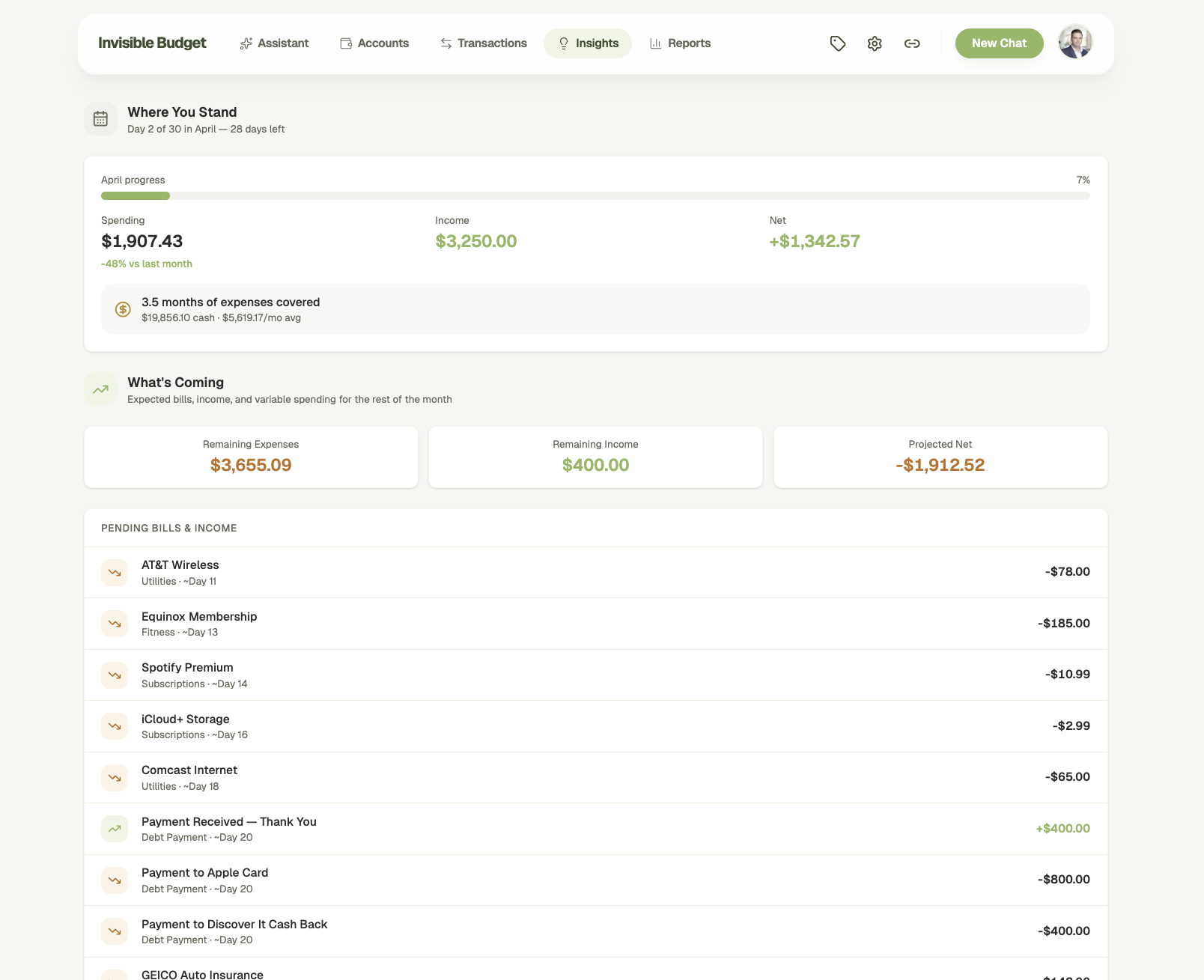
Instead of "you're 73% through your grocery budget," you see "3.5 months of expenses covered." Monthly spending, income, net cash flow, and the bills still to land — all in one place. The AI projects what's coming for the rest of the month.

Monthly insights showing spending, income, cash runway, and upcoming bills forecast
03

Every transaction. Automatically categorized.

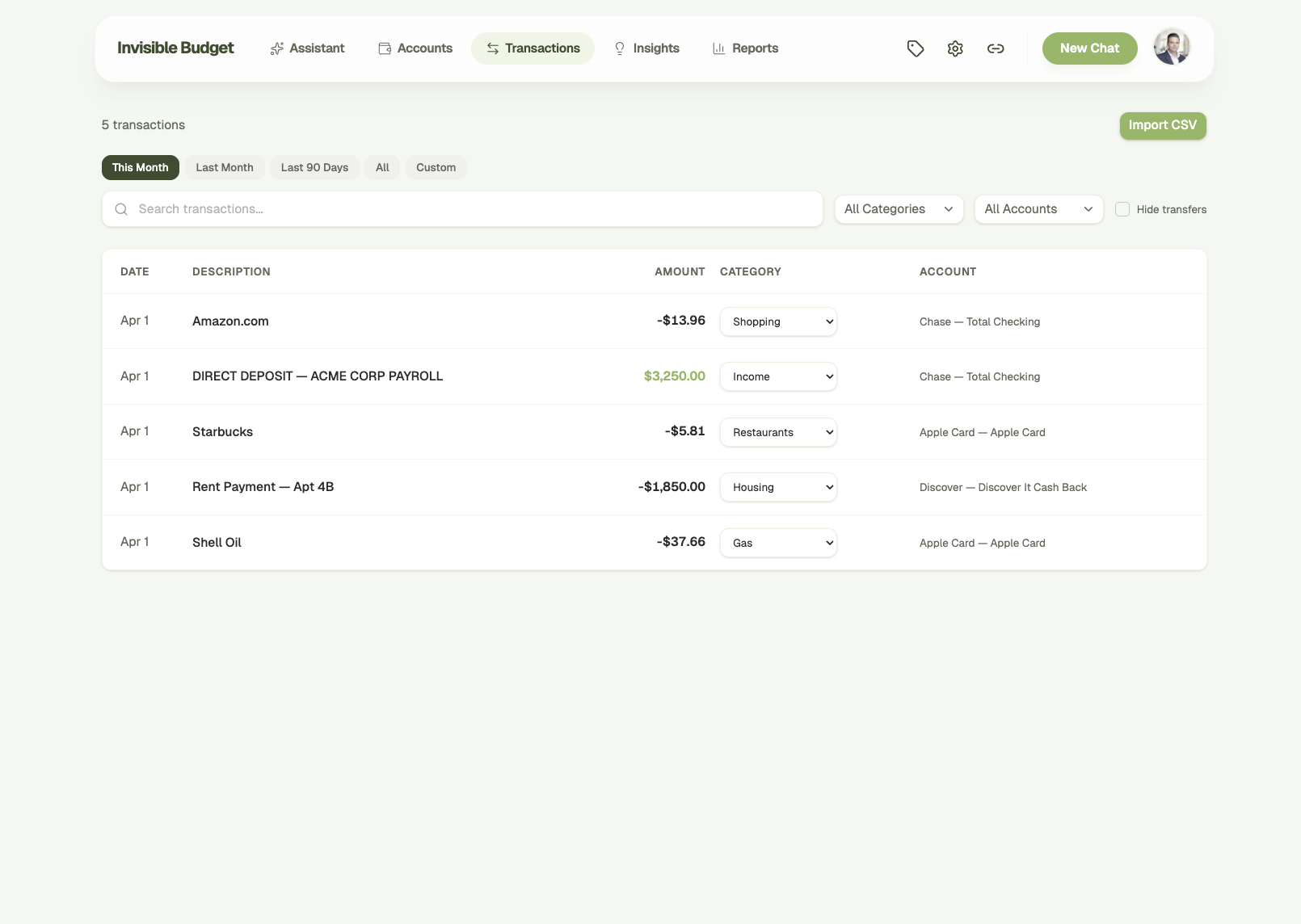
Transactions sync and categorize themselves. Search, filter by category or account, browse by time period. Correct a category once and the AI extracts the pattern for next time. Bringing history from another tool? CSV import catches duplicates before they land, and a whole import run undoes in one click. Mark the $3,000 vet bill as a one-off and it stops dragging your averages around — still visible, just no longer treated as normal.

Transaction list with automatic categorization, search, and filtering
04

AI-generated financial reports.

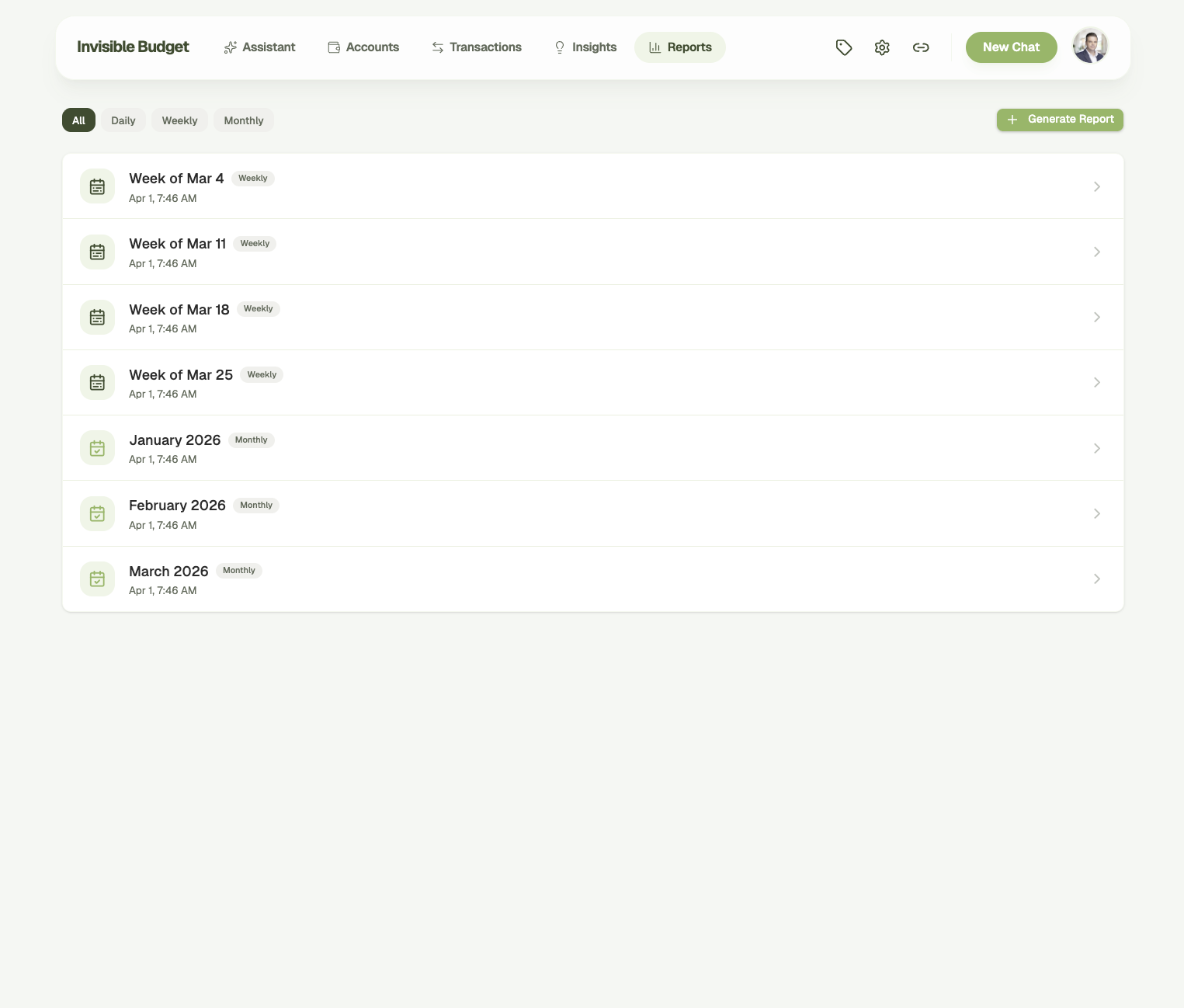
Weekly and monthly reports write themselves — no templates to configure, no exports to run. The AI reads your spending patterns, income trends, and anomalies, then tells you in plain language what happened and what to watch.

AI-generated weekly and monthly financial reports
05

Teach it once. It remembers.

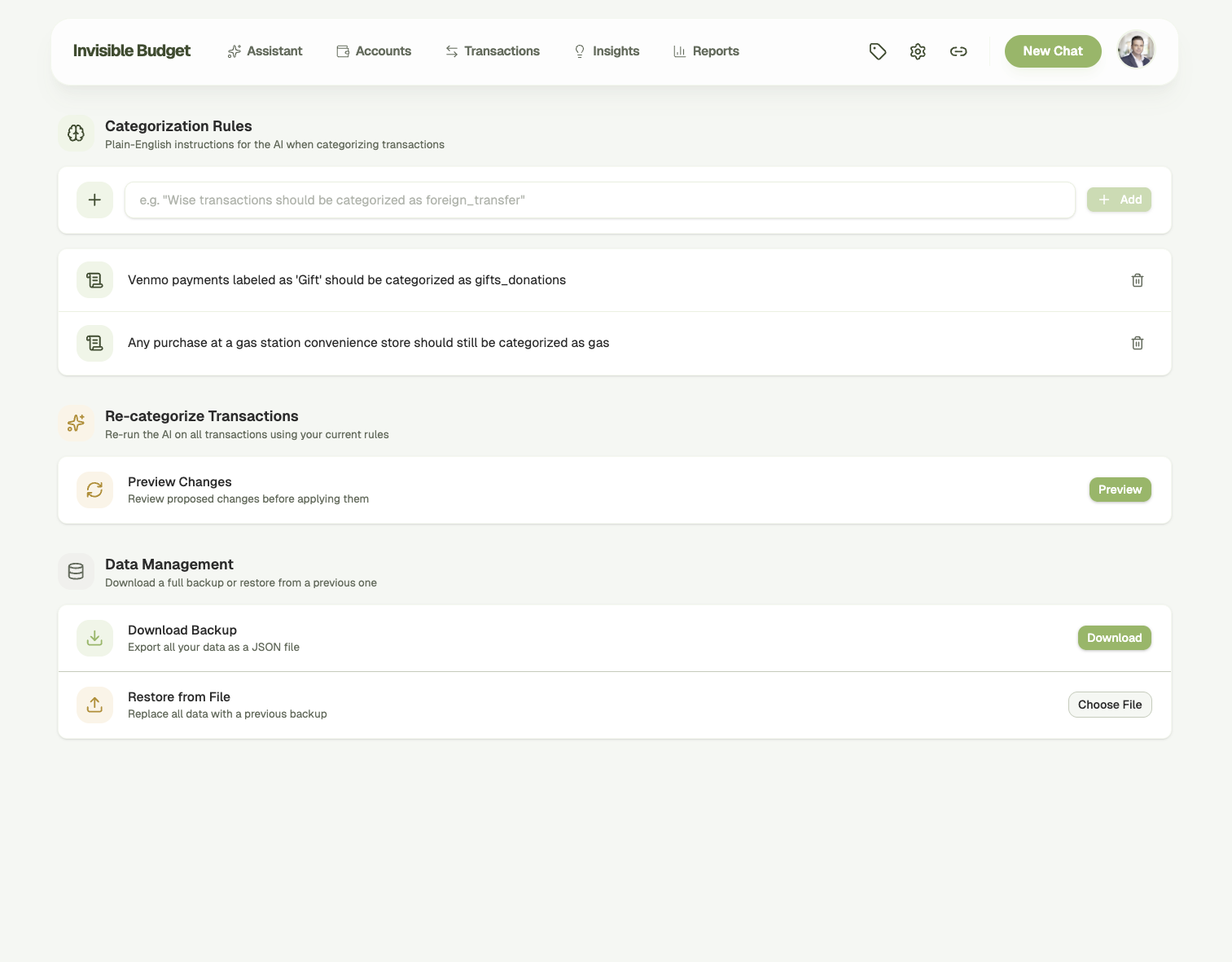
Add plain-English rules like "Venmo payments labeled 'Gift' are gifts," and preview the re-categorization before it applies. The assistant also keeps what you tell it in conversation — say "the monthly Zelle to John is my rent" and it stops guessing. Every fact it has saved is listed in Settings under AI knowledge, where you can edit or delete any of them.

Categorization rules, AI re-categorization, and data management settings
06

It reaches out to you.

Large transactions, low balances, unusual spending — delivered to your inbox instead of buried in an app you have to remember to open. Scheduled reports show up on their own. You control what you receive.

Alerts 3 this week
$

Large transaction

$1,850.00 — Rent Payment, Apt 4B. Your largest this month.

W

Weekly report ready

Spending was 23% below your four-week average. Runway 3.8 months.

!

Unusual spending

$340 at restaurants this week — your average. Just a heads up.

Sent to your inbox Manage alerts
07

Goals it helps you set, then watches.

Most apps hand you an empty field and a target you invented. This one reads your actual numbers first: "You're spending about $4,200 a month, so six months of cushion is about $25,200. Want to aim there?" From there it tracks your pace, breaks the goal into steps you can check off, and tells you when you've hit it. If you fall behind, you hear about it once — not every time you open the app.

Emergency fund Target $25,200 On pace

Saved so far

$8,400

33% there · $1,400/mo keeps you on schedule

Open a separate savings account
Automate $1,400 on the 1st
Revisit the target after tax season
On track for March 2027 Adjust goal
08

It knows your situation.

During setup the AI asks how you earn, whether your income is steady or comes in waves, who depends on you, and what matters most right now. Then it remembers. A quiet month isn't an alarm when the system knows you freelance. Every answer starts from your life, not a template — and you can see and edit everything it knows in Settings.

Your profile Updated Aug 12

How does your income arrive — steady paycheck, or does it vary?

I freelance. Some months are great, some are quiet.

What it remembers

Self-employed Income varies Priority: runway
Yours to change at any time Edit in Settings

A different approach

Not a better budget app. A replacement for one.

Others

You categorize transactions

Invisible Budget

AI categorizes and learns from your corrections

Others

You set budgets per category

Invisible Budget

No budgets — spending measured against your own averages

Others

You check dashboards

Invisible Budget

A briefing is already written when you open it

Others

You navigate menus and settings

Invisible Budget

You ask questions in plain English

Others

Shows "you're 73% through grocery budget"

Invisible Budget

Shows "you have 4.2 months of runway"

Others

Fixed dashboard layout

Invisible Budget

Visual cards composed for the question you asked

Others

AI is a chatbot sidebar

Invisible Budget

AI is the entire interface

Others

You check the app for updates

Invisible Budget

The app emails you what matters

Others

Same analysis for everyone

Invisible Budget

Knows how you earn, and reads your numbers in context

Others

Guilt-driven (over budget warnings)

Invisible Budget

Fact-driven (here's what happened, you decide)

S

"I built Invisible Budget because I tried every finance app and quit every one within a month. They all made me do the work — categorize this, set that budget, check this dashboard. I wanted something that just knew my money and told me what mattered."

Sean Culver

Founder, Invisible Budget

Your data, your control

Built on trust, not access.

Bank-level encryption

Credentials are encrypted at rest with AES-256-GCM — the same standard banks use.

Powered by Plaid

Accounts connect through Plaid, the same infrastructure behind Venmo and Robinhood. Read-only access, always.

Your data stays yours

Encrypted and isolated to your account. Never shared, never sold, never used to train models.

Precise to the penny

Every amount is stored and calculated in whole cents. No floating-point drift.

No hallucinated numbers

The AI queries your real data before it answers. It never guesses a balance or invents a transaction.

Model behavior is tested like code

17 behavioral eval suites run against real model calls, covering hallucination, tool use, and stale data.

Facts, not advice

The AI surfaces patterns and flags anomalies. It never tells you what to do with your money. Your data, your decisions.

Questions

The ones you're probably asking.

Smarter money management

Know your finances
without managing them.

Connect your accounts. The AI takes it from there.